


 IPTables Configuration: Rules and ExamplesChanging MTU on Windows and LinuxWorking with TCPDump: basics and filtersMeasuring Network Speed in Linux with Speedtest CLIDNS error “Temporary failure resolving…”: how to fix itHow to Collect Network Traceroute on Linux and WindowsMonitoring Network Traffic with VnStat
Configuring server.properties
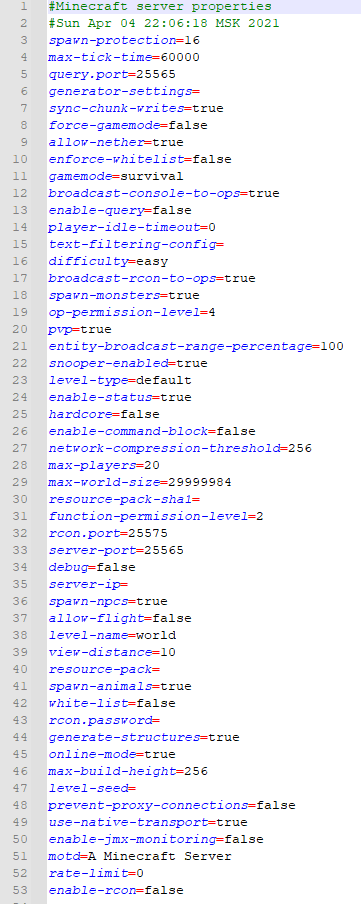
server.properties is the main configuration file for all server cores. In this article, you can find detailed information about the functions of each option in this config.
-
spawn-protection
This setting allows you to define the size of the spawn protection radius. The protected area starts at coordinates x-0 z-0. By default, the first 16 blocks in each direction are protected from being modified by any player.
-
max-tick-time
The maximum number of milliseconds a single tick is allowed to take before the server watchdog automatically stops the server.
It is recommended that only experienced users change this value.
-
query.port
The port used to retrieve additional server information via various external services.
-
generator-settings
Flat world generation settings for the server.
-
sync-chunk-writes
Enables synchronous chunk saving to disk.
-
force-gamemode
If enabled, all players will be forced into the default gamemode specified in the gamemode setting upon joining the server.
-
allow-nether
Enables or disables the Nether world on the server.
-
enforce-whitelist
When enabled, the server will automatically reload the whitelist before each player join to check for newly added usernames.
-
gamemode
Sets the default gamemode for all new players on the server.
-
broadcast-console-to-ops
If enabled, all console commands executed on the server will be broadcast to server operators.
-
enable-query
Enables the GameSpy4 query service, which allows external tools to retrieve information about the server. The port for this service is configured via query.port.
-
player-idle-timeout
Sets the time (in minutes) after which idle players will be automatically disconnected from the server. By default this is set to 0 (players are not kicked for inactivity).
-
text-filtering-config
A setting that allows you to link a specific external service to the server for automatic text filtering in chat and written books.
-
difficulty
Sets the game difficulty on the server. Possible values:
-
broadcast-rcon-to-ops
If enabled, commands executed via RCON will be broadcast to server operators.
-
spawn-monsters
Controls whether hostile mobs can spawn on the server.
-
op-permission-level
Defines the permission level of server operators. Possible values:
-
pvp
Controls whether players can attack each other. If set to false, players cannot deal any damage to other users.
-
entity-broadcast-range-percentage
Can be set from 0 to 500. Adjusts the entity tracking/render distance for players as a percentage of the default. Higher values may reduce server performance.
-
snooper-enabled
Allows the server to automatically send some usage statistics to the developers.
-
level-type
Defines the world generation type for the server. Possible values:
-
enable-status
By default set to true. The server will appear as online in the multiplayer server list. If disabled, the server will appear offline, but players will still be able to connect.
-
hardcore
Enables Hardcore mode on the server. After death, the player is switched to Spectator mode.
-
enable-command-block
Allows the use of Command Blocks on the server.
-
network-compression-threshold
Enables automatic compression of network packets. Possible values:
-
max-players
Sets the maximum number of players allowed on your server.
-
max-world-size
Allows you to set a world border radius, starting from the origin coordinates.
-
resource-pack-sha1
A special SHA-1 hash used for faster verification of the resource pack. Must be specified in hexadecimal format.
-
function-permission-level
Defines the access level for game functions, including function-type scripts.
-
rcon.port
Specifies the port used for remote server management via RCON.
-
server-port
Specifies the port (for TCP and UDP) used to access the game server. The default value is 25565.
-
debug
Enables debug mode on the server.
-
server-ip
The server IP address that players will use to connect. By default, no value is set, so the address of the machine running the server will be used.
-
spawn-npcs
Allows NPCs to spawn in villages on the server.
-
allow-flight
Allows players to fly in Survival mode when an appropriate plugin is installed. Often used to prevent players from being automatically kicked for flying.
-
level-name
Sets the folder name for the default world on the server.
-
view-distance
Defines the number of chunks around each player that will be loaded. This setting can significantly affect server performance.
-
resource-pack
Specifies the default resource pack for the server. When joining, players will be prompted to install this server resource pack.
More details — Installing a resource pack on the server.
-
spawn-animals
Controls whether animals can spawn in the world.
-
white-list
Enables the standard whitelist. This feature allows you to add only specific players to a list of users permitted to join the server.
-
rcon.password
Specifies the password used to access the server via RCON. Make sure that enable-rcon is enabled.
-
generate-structures
Controls whether structures (such as villages, dungeons, etc.) are generated in the world.
-
online-mode
Enables authentication with Mojang servers. Only players with a valid, licensed Minecraft account will be able to join the server.
-
max-build-height
The maximum build height on the server. The default value is 256.
-
level-seed
Specifies the world seed used for world generation. If left blank, a random seed will be generated.
-
prevent-proxy-connections
If enabled, all subsequent player connections made through a proxy will be blocked.
-
use-native-transport
Optimizes sending and receiving network packets on Linux. It is recommended to keep this enabled.
-
enable-jmx-monitoring
Allows you to enable an MBean (a feature in Java that lets classes expose some of their data externally) with the object net.minecraft.server:type=Server and the attributes averageTickTime and tickTimes, which output the time spent processing a single server tick in seconds (related to TPS).
-
motd
Specifies the server description (Message of the Day). This setting supports formatting and Unicode characters.

-
rate-limit
Sets a limit on requests for UUIDs and player usernames.
-
enable-rcon
Controls whether RCON is enabled on the server. The configuration for RCON is done via rcon.password and rcon.port.