


Deploying DeepSeek on Your Own Server in a Few Clicks
DeepSeek AI is a powerful open AI model that can run without requiring a GPU. Combined with Ollama, it allows you to run AI locally with full control over performance and privacy.
Hosting DeepSeek on your own server provides a high level of security, eliminating the risk of data interception through an API. The official DeepSeek servers are often overloaded. Local deployment lets you use only your own AI resources without sharing them with other users.
Please note that DeepSeek is a third-party product. SpaceCore Solution LTD. is not responsible for the operation of this software.
#What specifications are required?
Let’s compare models with different requirements. Each model can run both on CPU and GPU. However, since we are using a server, this article will focus on installing and running the model on CPU resources.
| Model version | Size | RAM | Recommended plan | Capabilities |
|---|---|---|---|---|
| deepseek-r1:1.5b | 1.1 GB | 4 GB | Hi-CPU Galaxy | Simple tasks, ideal for testing and trial runs. |
| deepseek-r1:7b | 4.7 GB | 10 GB | Hi-CPU Orion | Writing and translating texts. Developing simple code. |
| deepseek-r1:14b | 9 GB | 20 GB | Hi-CPU Pulsar | Advanced capabilities for development and copywriting. Excellent balance of speed and functionality. |
| deepseek-r1:32b | 19 GB | 40 GB | Hi-CPU Infinity | Performance comparable to ChatGPT o1 mini. In-depth data analysis. |
| deepseek-r1:70b | 42 GB | 85 GB | Minimum dedicated server | High-level computations for business tasks. Deep data analysis and complex development. |
| deepseek-r1:671b | 720 GB | 768 GB | High-end dedicated server on demand | The main and most advanced DeepSeek R1 model. Provides computational capabilities comparable to the latest ChatGPT models. We recommend hosting it on a powerful dedicated server with NVMe drives. |
#Installing DeepSeek 14B
We will install the 14B model as an example, since it provides high performance with moderate resource usage. The instructions are suitable for any available model, and you can install a different version if needed.
For installation we use a Hi-CPU plan with Ubuntu 22.04, which is an ideal choice for DeepSeek: Hi-CPU with Ubuntu 22.04.
Update the repositories and system packages to the latest version.
sudo apt update && sudo apt upgrade -yInstall Ollama, a software manager required to deploy DeepSeek.
curl -fsSL https://ollama.com/install.sh | sh && sudo systemctl start ollamaAfter the installation is complete, run the command to download the required DeepSeek model.
ollama pull deepseek-r1:14bdeepseek-r1:14b is the name of the selected model. Change it if you want to install a different version, for example deepseek-r1:32b.
Installing this model will take approximately 2 minutes when using a Hi-CPU server, thanks to the high network speed. Then run the command to start the DeepSeek model.
ollama run deepseek-r1:14bA command prompt for entering messages will appear. Great — you can now chat with the AI!

You can also send a one-off command, for example:
ollama run deepseek-r1:14b "What is heavier: 1 kg of iron or 1 kg of feathers?"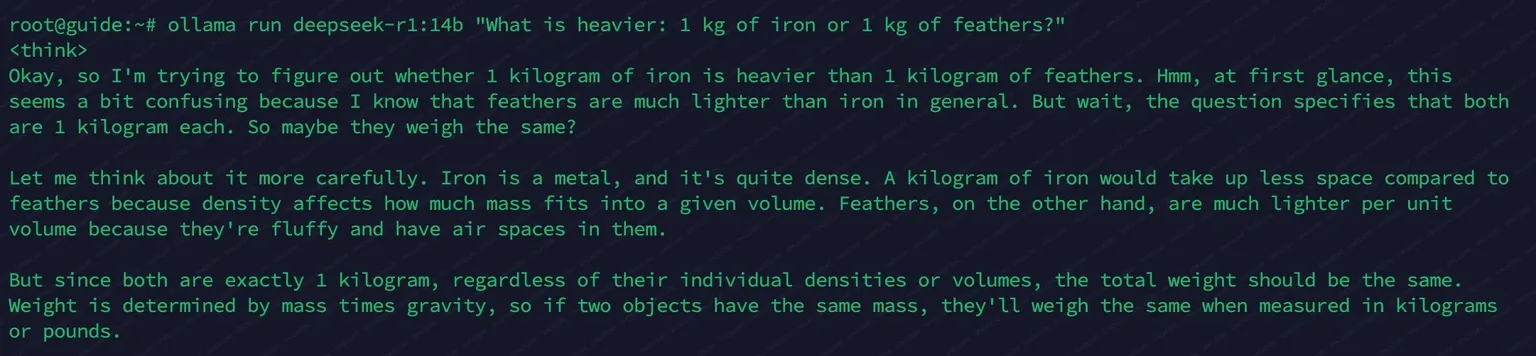
To generate a public key and enable API access, run the command:
ollama serveTo check the installed models and their status, run:
ollama list
#Conclusion
We recommend hosting DeepSeek R1 models on servers with sufficient RAM. For stable operation, it is best to rent servers with at least a small memory reserve and fast NVMe drives.
The plans listed in the table are a perfect fit for hosting DeepSeek AI. We guarantee the quality of SpaceCore servers. Entrust your server hosting to us and build an infrastructure for reliable and convenient use of DeepSeek in your business.
Did not find the answer? We are online 24/7.Contact support