


IPTables Configuration: Rules and Examples
This is a subsystem for working with network packets that filters all connections on the server. In this article, we will take a closer look at configuring IPTables.
#General information
IPTables is built into the main Linux kernel by default, but the user-space tools for managing it are not installed by default in many distributions, so let’s use the command below to install the utility.
#Debian / Ubuntu
[sudo] apt install iptablessudo is used on Ubuntu OS. On Debian, run the command without it.
#CentOS [Fedora]
sudo yum install iptables#Configuration
After installing the utility, we can proceed to its detailed configuration.
#Arguments
-A — append a rule to a chain.
-C — check rules.
-D — delete a rule.
-I — insert a rule at a specific position.
-L — list all rules in the current chain.
-S — list all rules.
-F — flush all rules.
-N — create a chain.
-X — delete a chain.
-P — set the default policy.
-p — specify a protocol.
-s — specify a source address.
-d — specify a destination address.
-i — incoming network interface.
-o — outgoing network interface.
-j — action to take when the rule matches.
INPUT — handles incoming packets and connections.
FORWARD — used for forwarded connections. This is where packets go that are sent to your server but do not have it as the final destination.
OUTPUT — the opposite of INPUT. Used for outgoing packets and connections.
ACCEPT — accept the packet.
DROP — drop the packet.
REJECT — reject the packet.
LOG — log the matching packet.
QUEUE — send the packet to a user-space application.
#Opening port(s)
First, let’s check the list of current rules:
iptables -L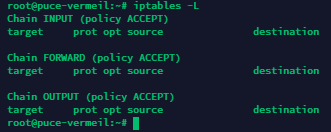
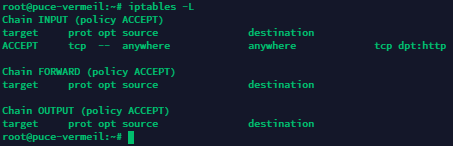
Now let’s open a single TCP port 80 for incoming connections:
iptables -t filter -A INPUT -p tcp --dport 80 -j ACCEPTCheck the list again...
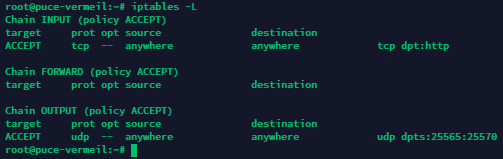
Now let’s open a range of UDP ports from 25565 to 25570 for outgoing connections:
iptables -t filter -A OUTPUT -p udp --dport 25565:25570 -j ACCEPTCheck the result.
Want to block all incoming connections to TCP 250? No problem.
iptables -t filter -A INPUT -p tcp --dport 250 -m state --state ESTABLISHED -j DROP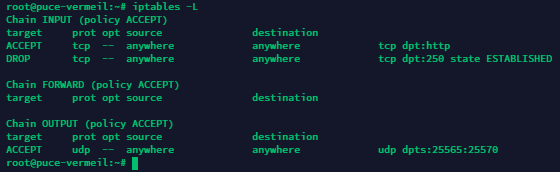
#Deleting rules
Now let’s delete the rule that allows incoming connections to TCP 80:
iptables -t filter -D INPUT -p tcp --dport 80 -j ACCEPT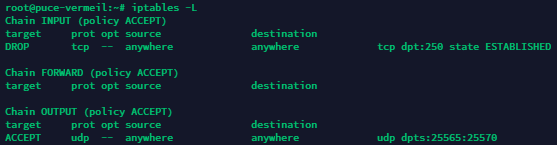
#Deleting all rules
To do this, use the following command:
iptables -F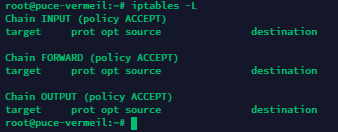
#Saving created rules
By default, all created rules are applied only until the next reboot and will be removed when it occurs. To avoid this, let’s save the IPTables rules we have created. Use the following command:
iptables-save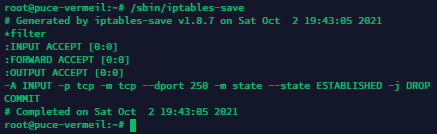
Done. The rules have been saved and will remain active even after the server is rebooted!
Did not find the answer? We are online 24/7.Contact support