


Changing MTU on Windows and Linux
Let’s look at the methods for changing the MTU value on servers running Windows and Linux.
#Windows
We will make the change using the CMD utility.
First, you need to open Command Prompt as Administrator. Then use the following command to view all existing network interfaces and their MTU values.
netsh interface ipv4 show subinterfaces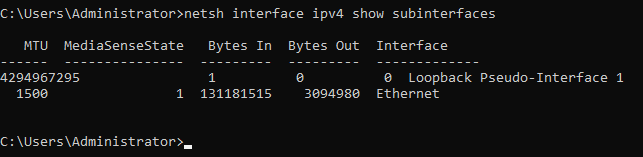
You will get an output similar to this.
Where 1500 (default) is the MTU value.
Ethernet is the default interface name.
Next, change the MTU value with the following command:
netsh interface ipv4 set subinterface "Ethernet" mtu=1400 store=persistentWhere Ethernet is the name of the network interface.
1400 is the new MTU value to be set.
Here is the result.

#Debian / Ubuntu
Run the following command to edit the network interfaces configuration; we will use Nano:
nano /etc/network/interfacesThen, at the end of the corresponding network interface configuration, add
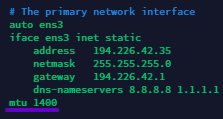
Press Ctrl + X, then Y to save the changes.
Run the following command to restart the networking service:
systemctl restart networking
Did not find the answer? We are online 24/7.Contact support