IPTables Configuration: Rules and ExamplesChanging MTU on Windows and LinuxWorking with TCPDump: basics and filtersMeasuring Network Speed in Linux with Speedtest CLIDNS error “Temporary failure resolving…”: how to fix itHow to Collect Network Traceroute on Linux and WindowsMonitoring Network Traffic with VnStat
Retrieving Disk Serial Numbers
Let’s look at how to retrieve information about storage devices on dedicated servers.
We can obtain the required information using the lsblk utility, which is included by default in most Linux distributions.
A standard lsblk invocation will provide us with basic information about the storage devices on the dedicated server.
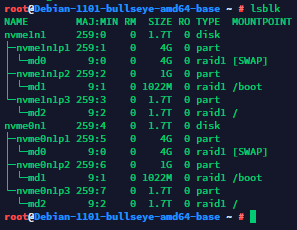
However, its default output does not show disk serial numbers. To retrieve them, we need to add a few arguments so that we can see the serial number for each device. Use the following command:
lsblk -o name,type,size,serial
And we will get output similar to this:
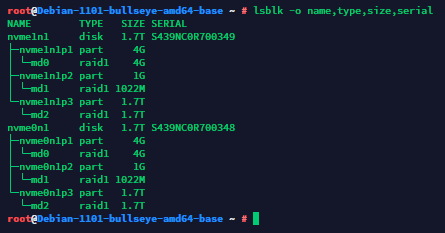
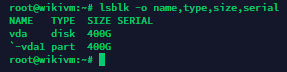
Exactly what we need: each physical storage device is shown together with its serial number. Speaking of physical devices, it makes little sense to try to obtain a serial number on virtual servers (VDS), since the disks are virtual rather than physically present. The output in that case will look something like this: