


Personal Account
Registration and access

Payments & Finance
Communications and Notifications
Notifications
Integrations and bots
Status & Reference (Policies, Limits, Terms)
Restrictions & Policy
Terminology and Metrics
Servers: VPS/VDS and dedicated
Start and management
Providers: Hetzner
Providers: Contabo
Linux: access, administration, security
Access and Accounts
Software and Environments
Backups and FTP
Networking and Diagnostics (Linux)
 IPTables Configuration: Rules and ExamplesChanging MTU on Windows and LinuxWorking with TCPDump: basics and filtersMeasuring Network Speed in Linux with Speedtest CLIDNS error “Temporary failure resolving…”: how to fix itHow to Collect Network Traceroute on Linux and WindowsMonitoring Network Traffic with VnStat
Windows: Access, Administration, Networking
Connection and Access
Web Stack and Databases
Languages and PHP Environment
Certificates and Domains
VPN & Privacy
Client: Access and Applications
Game Hosting: Minecraft
Server Setup
AI and ML
Model Deployment
Reselling
Changing the MTU value
Let’s look at the methods for changing the MTU value on servers running Windows and Linux.
Windows
We will make the change using the CMD utility.
First, you need to open Command Prompt as Administrator. Then use the following command to view all existing network interfaces and their MTU values.
netsh interface ipv4 show subinterfaces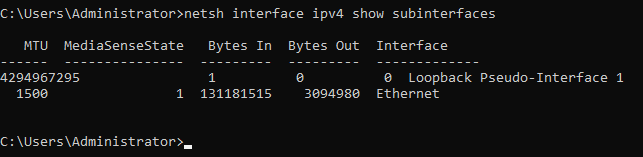
You will get an output similar to this.
Next, change the MTU value with the following command:
netsh interface ipv4 set subinterface "Ethernet" mtu=1400 store=persistentHere is the result.

Debian / Ubuntu
Run the following command to edit the network interfaces configuration; we will use Nano:
nano /etc/network/interfaces
Then, at the end of the corresponding network interface configuration, add mtu 1400
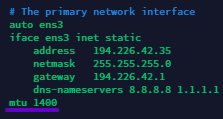
Press Ctrl + X, then Y to save the changes.
Run the following command to restart the networking service:
systemctl restart networking