


How to Find the IP Address of Your Computer
An IP address is the number of a device on a network. Computers use it to find each other and to know where to send data. A computer usually has two addresses. The local one works inside your home network, and the public one is what the computer uses on the internet. Below we show how to find both and briefly explain how addresses work.
#How to Find Your Public IP Address
The easiest way is to open test-ipv6.cz. In a couple of seconds it shows your public IPv4 address, your provider and whether you have IPv6. If IPv6 works, the site shows that address too.
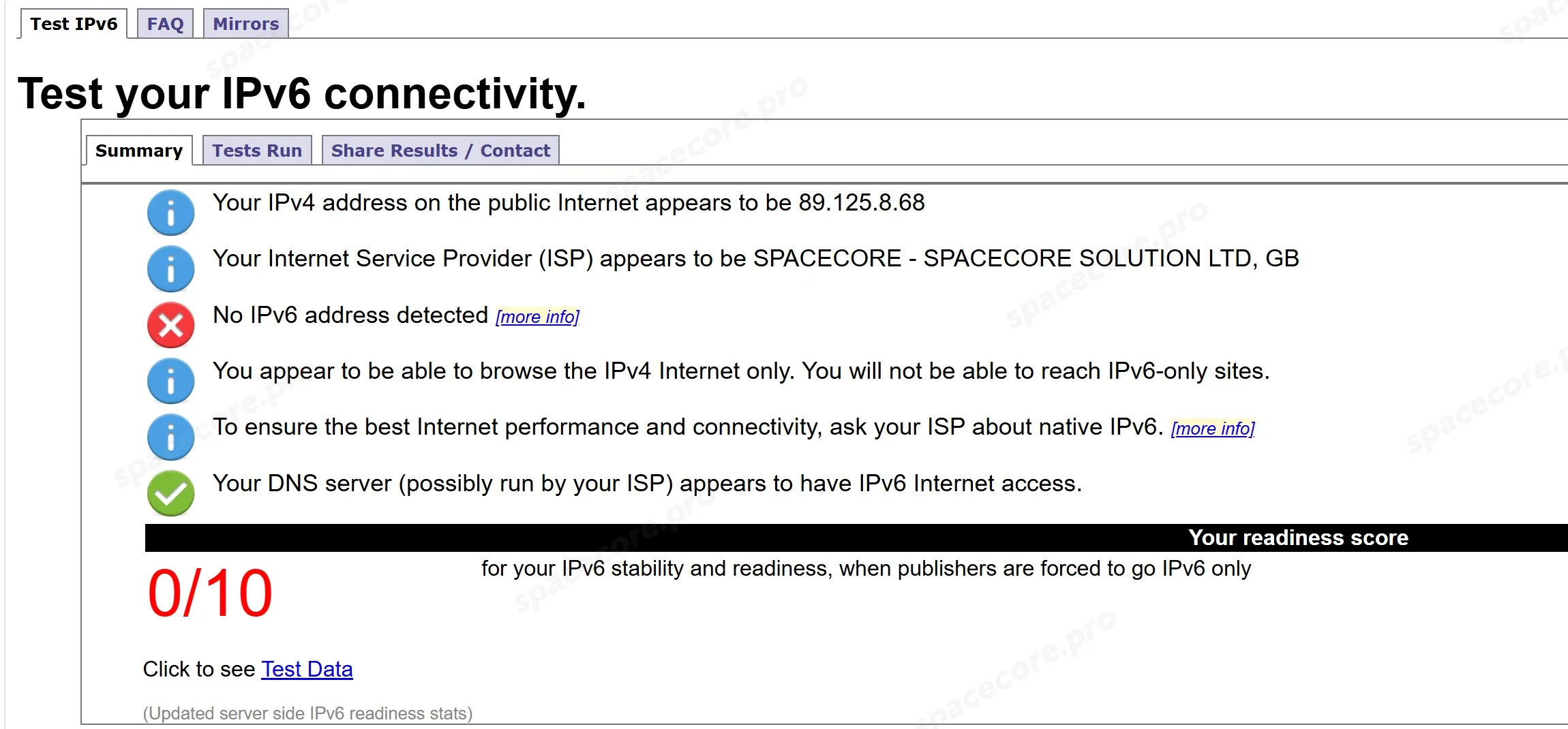
The site shows the address you use to go online. If a VPN is on, it will be the VPN server's address. This is also a handy way to check that your VPN works.
#How to Find Your IP Address on Windows
#Windows Settings
Press Win + I and open "Network & internet" → "Ethernet". For a wireless network open "Wi-Fi" → your network properties. Scroll down the page.
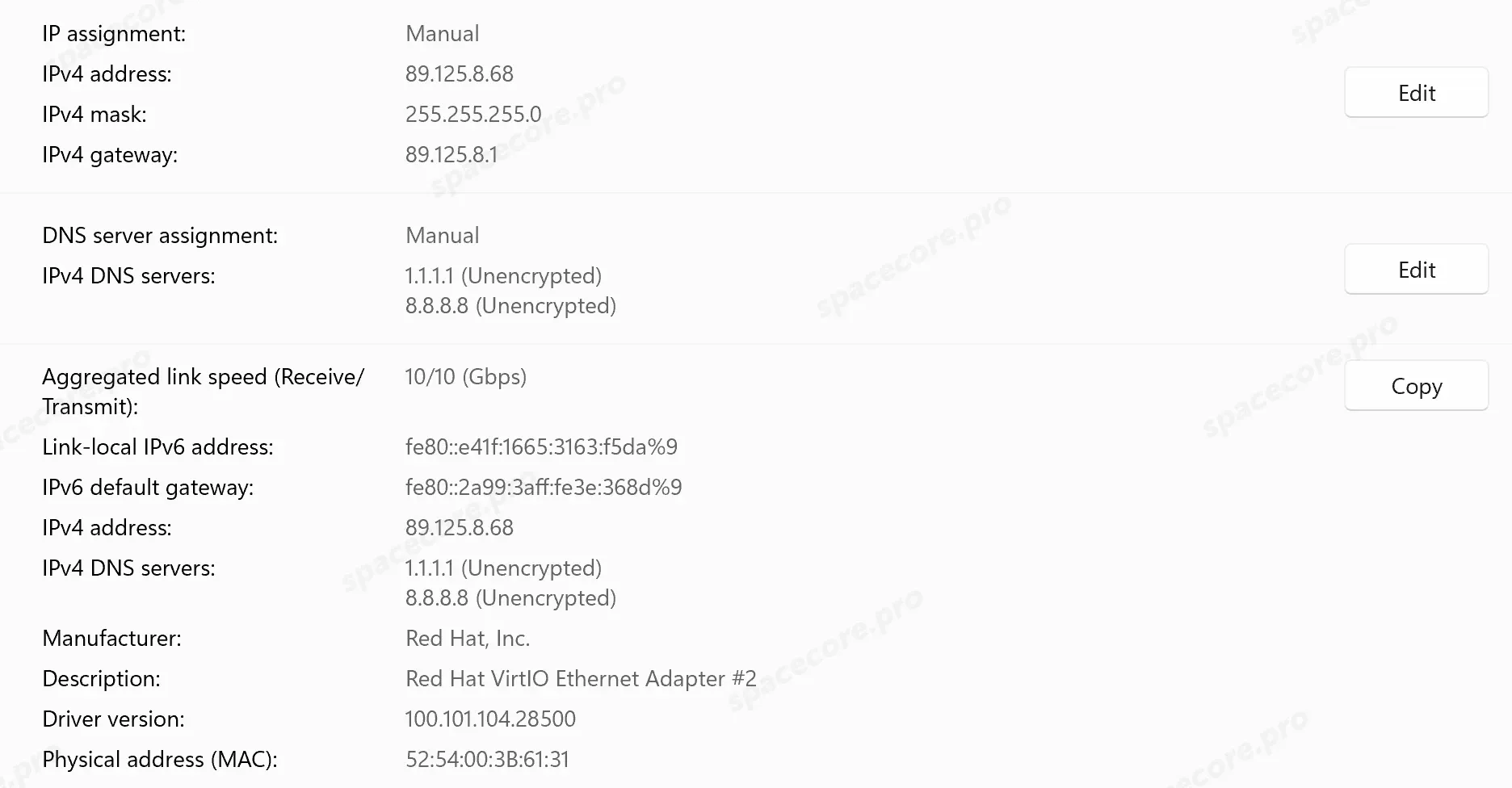
- IPv4 address is the computer's address. If the computer is connected through a router, you will see a local address like 192.168.1.101.
- IPv4 gateway is the router's address. Use it to open the router settings.
- IP assignment shows how the address was obtained. Automatic (DHCP) means from the router, Manual means by hand.
#Task Manager
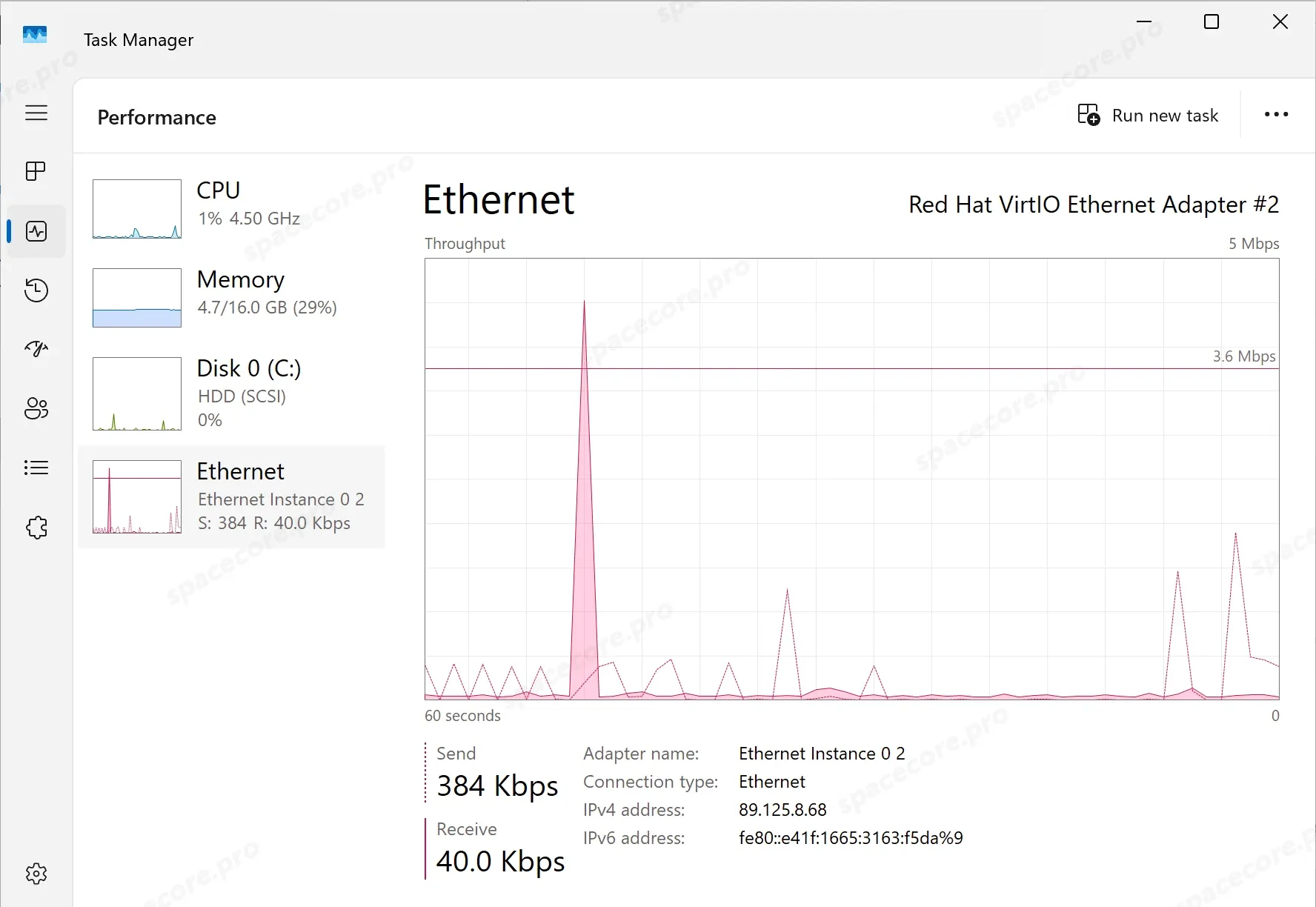
Press Ctrl + Shift + Esc, open the "Performance" tab and select "Ethernet" or "Wi-Fi". The IPv4 and IPv6 addresses are at the bottom of the window.
#Command Prompt
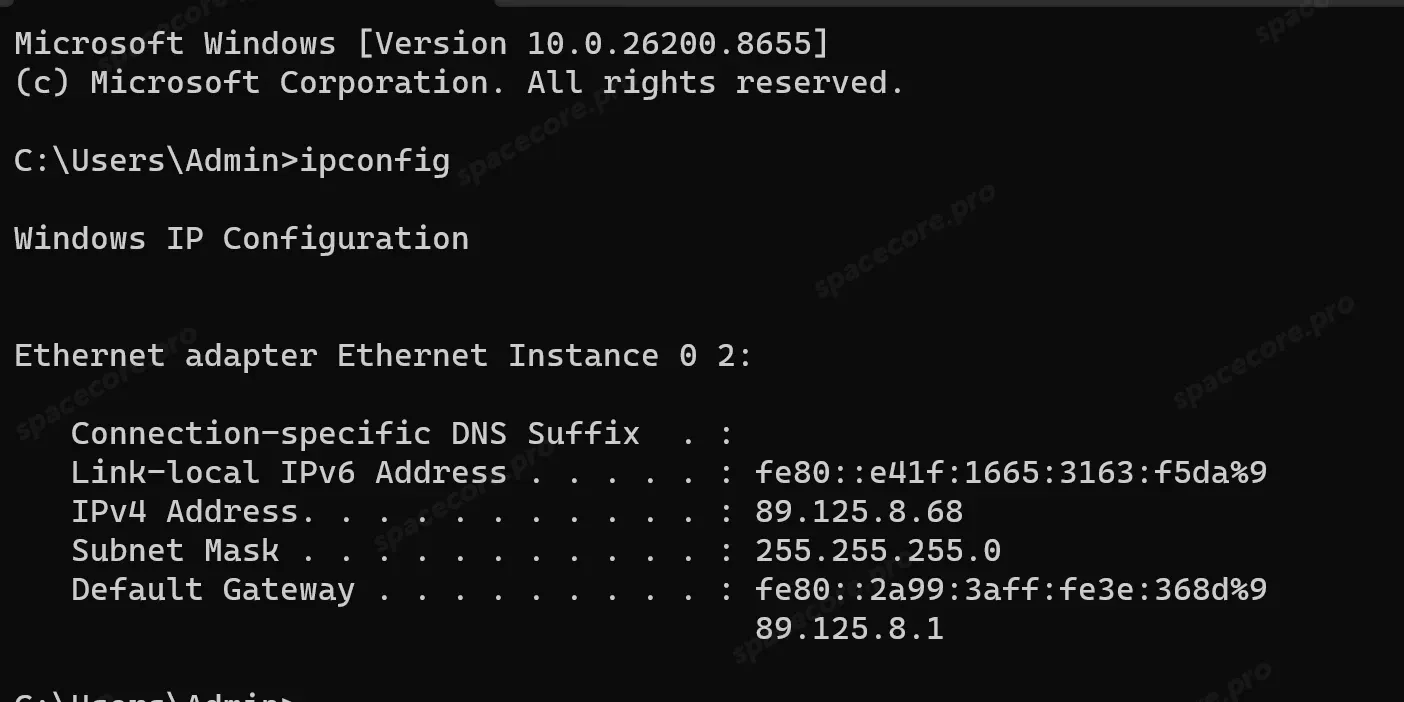
Press Win + R, type cmd and run the command.
ipconfigFor each connection the command shows the address, subnet mask and gateway. ipconfig /all also adds the MAC address, DNS servers and DHCP details.
You can also find the public address without a browser. The first command asks icanhazip.com for it, the second asks the OpenDNS DNS server.
curl -4 icanhazip.comnslookup myip.opendns.com resolver1.opendns.com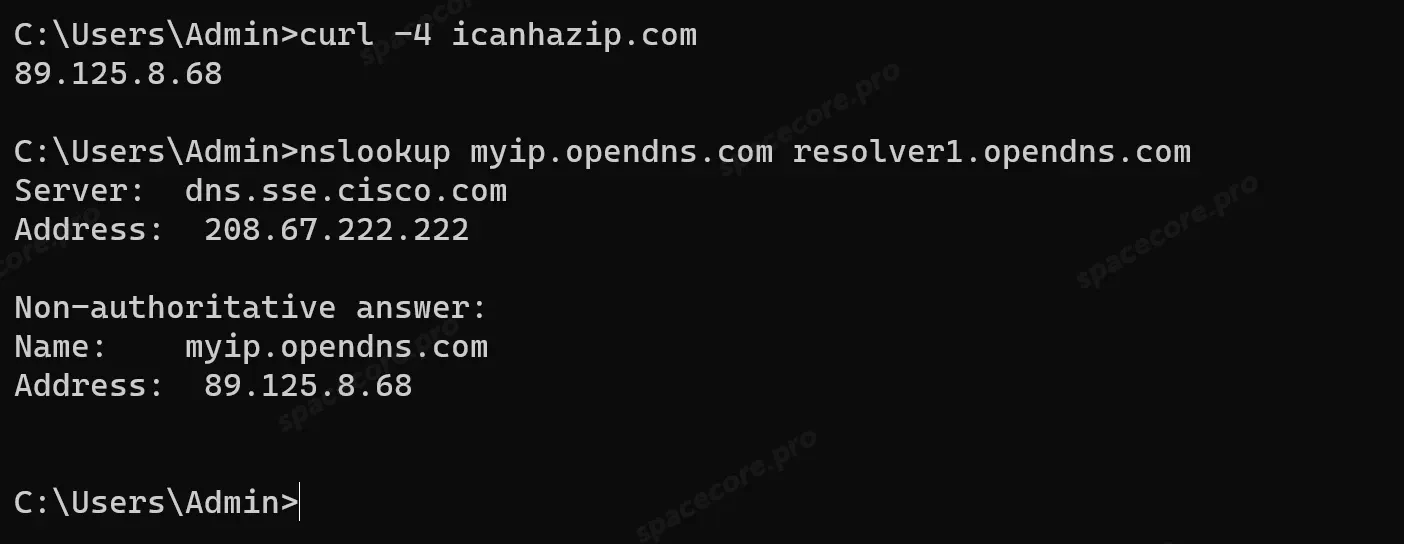
In PowerShell the curl command is a different program, and instead of the address it shows the warning Security Warning: Script Execution Risk. Run curl.exe or use Command Prompt.
#How to Find Your IP Address on Linux
The commands are the same on Ubuntu, Debian, CentOS and other distributions. Open a terminal or connect to your server over SSH, our detailed guide explains how.
ip aThe address is on the inet line of the network interface, here it is ens3. The number after the slash is the subnet mask, /24 equals 255.255.255.0. The lo interface with 127.0.0.1 is the computer itself, you can skip it.
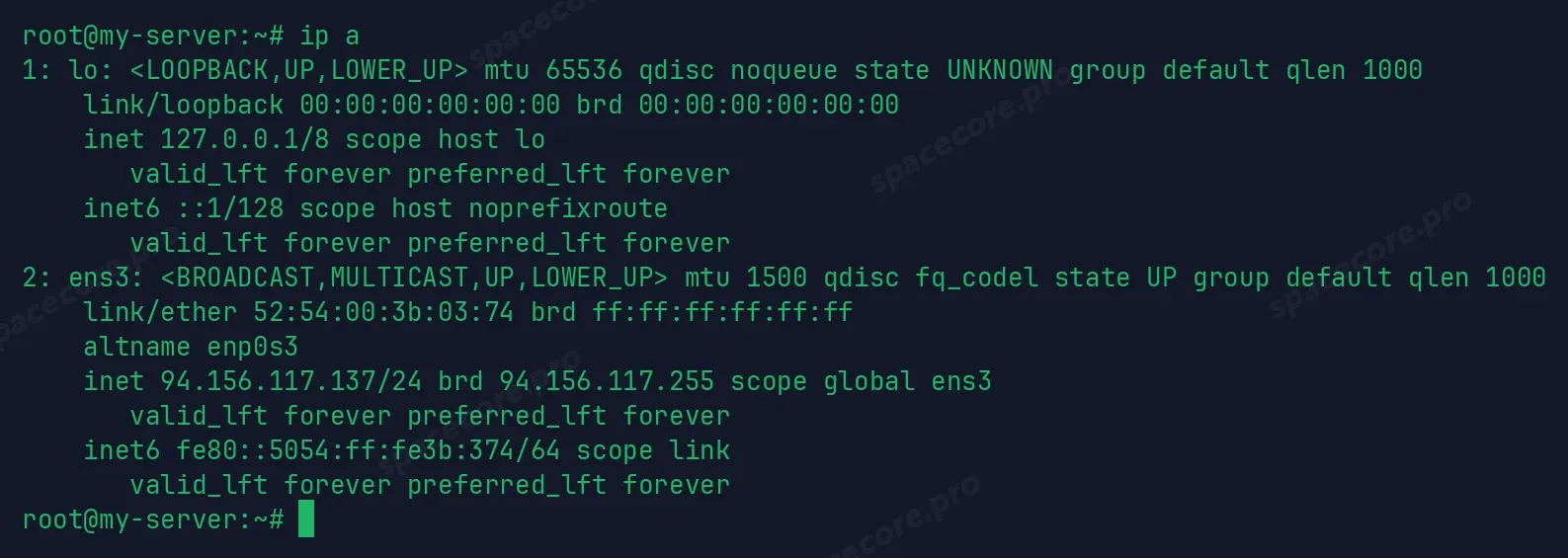
If you only need the address, run hostname -I. The old ifconfig command is missing on modern distributions, ip a replaces it.
The gateway address is on the default via line.
ip route
The public address is shown by the same curl command as on Windows.
curl -4 icanhazip.com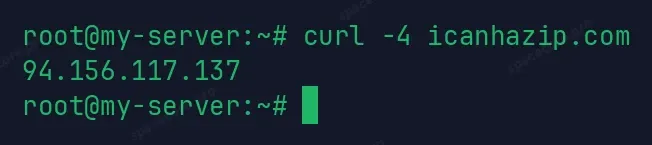
ipinfo.io shows the country, city and provider along with the address. This is how you check which country websites think you are in.
curl ipinfo.io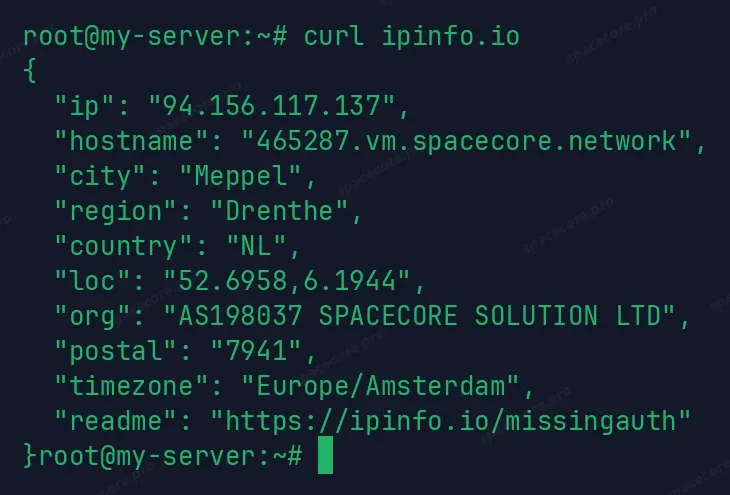
On Ubuntu with a desktop you can see the address without a terminal. Open "Settings" → "Network", click the gear next to the connection and go to the "Details" tab.
#How IP Addresses Work
#Public and local address
At home it is the router that goes online. It gets one public address from the provider and hands out local ones to the devices in your home. When a laptop opens a website, the router replaces its local address with the router's public one. This is called NAT, and that is why a website sees the router's address, not the laptop's.
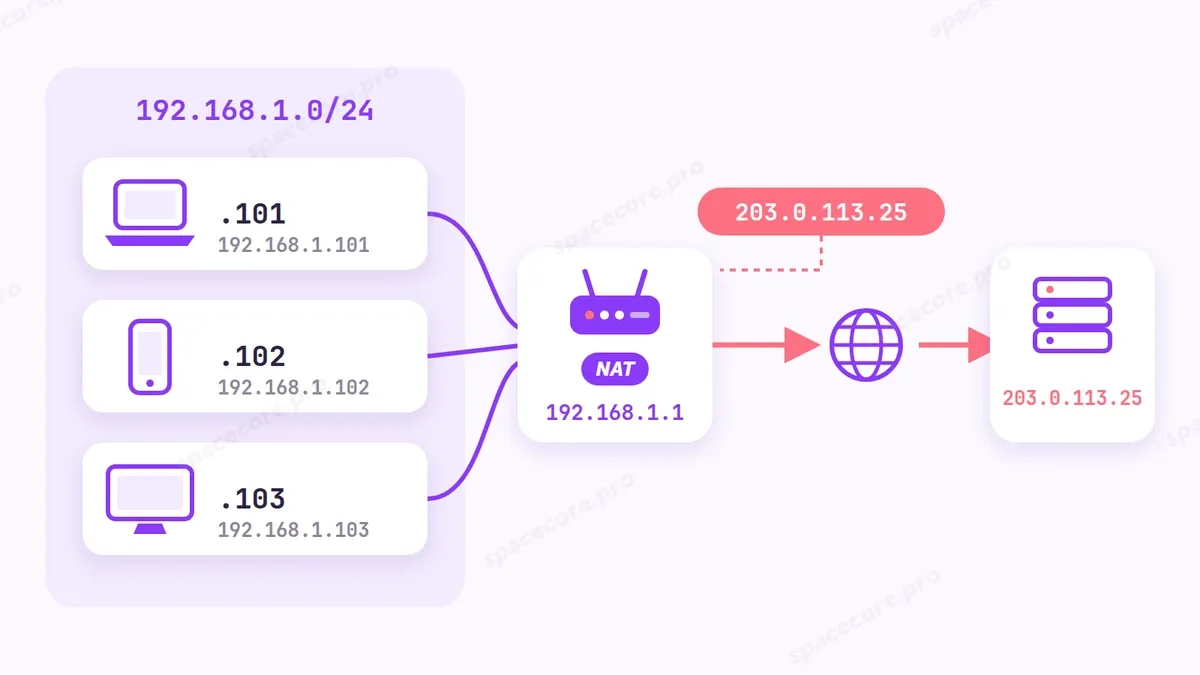
Local addresses come from the ranges 192.168.x.x, 10.x.x.x and 172.16-172.31.x.x. They are reserved for private networks and never appear on the internet.
#Public IP and CGNAT
A public address belongs only to you and is reachable from the internet. There are not enough IPv4 addresses, so many providers give the router an address inside their own network, often from the range 100.64-100.127.x.x, and let subscribers out through a shared NAT. It is called CGNAT.
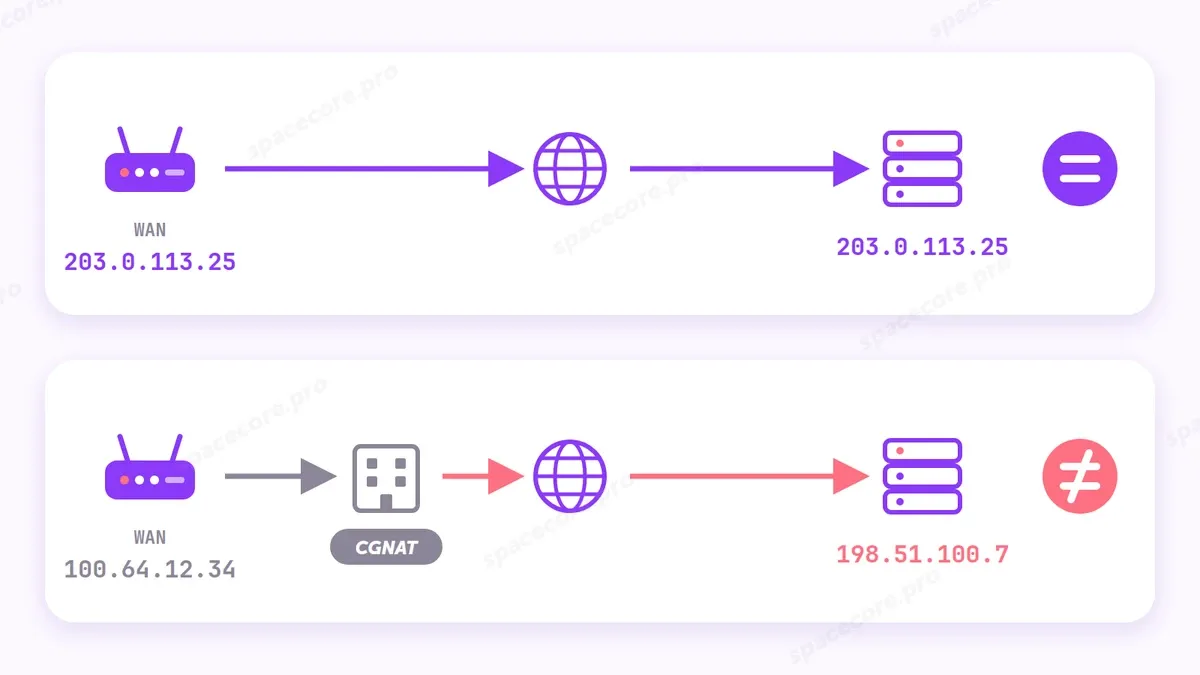
It is easy to check. Open the router settings at the gateway address and compare the WAN address with the one an IP check website shows. If they match, the address is public. If they differ, you are behind CGNAT.
For websites and messengers it makes no difference. A public address matters when something connects to you from outside, for example remote desktop, cameras or a game server. Behind CGNAT such connections will not reach you. If you need a permanent public address for a website or a server, a VPS is easier, every one of our servers has its own dedicated IPv4.
#DHCP, dynamic and static address
A computer usually gets its local address on its own over DHCP, which is why a device works right after connecting to the network. Getting an address takes four steps.
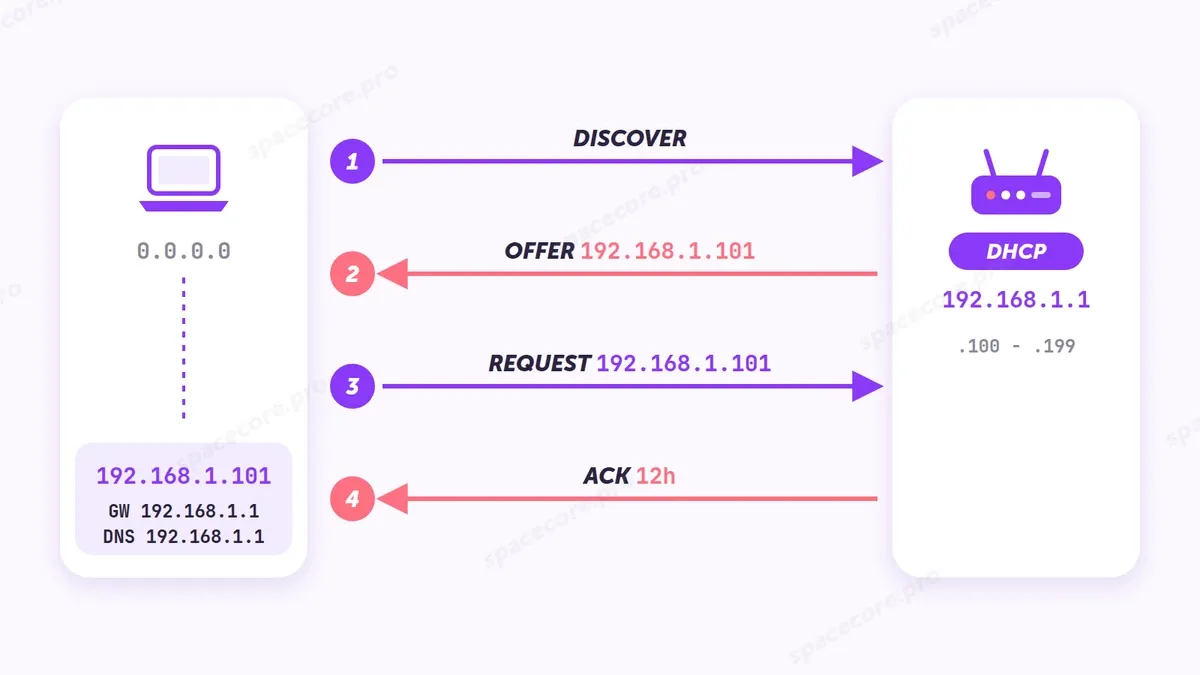
- Discover - the computer looks for a DHCP server on the network, usually the router.
- Offer - the router offers a free address.
- Request - the computer asks to keep this address.
- Ack (acknowledgement) - the router confirms and leases the address, for 12 hours in the diagram. Along with the address the computer gets the gateway (GW, the router's address) and a DNS server.
Such an address is dynamic. It is leased, and after the lease ends or the router restarts it may change. If the router does not answer, Windows assigns itself a 169.254.x.x address and there is no internet.
A static address is set by hand and does not change. Servers, printers and cameras are set up this way. In Windows you do it with the "Edit" button in the IP assignment line. Select Manual instead of Automatic (DHCP) and enter the address, mask, gateway and DNS.
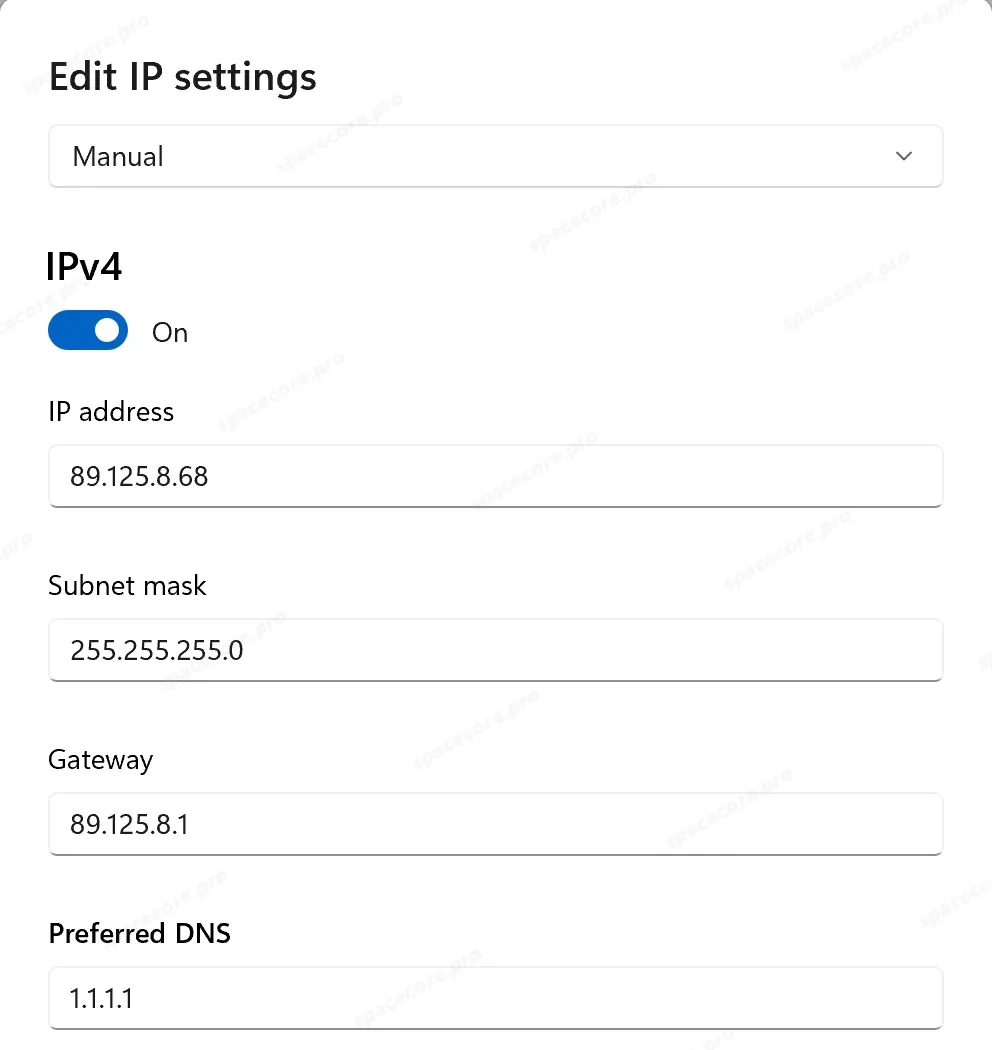
At home it is easier to fix the address in the router with DHCP Reservation. The computer stays on automatic settings, and the router always gives it the same address. If you set by hand an address that is already taken, one of the devices may lose the network.
#IPv4 vs IPv6
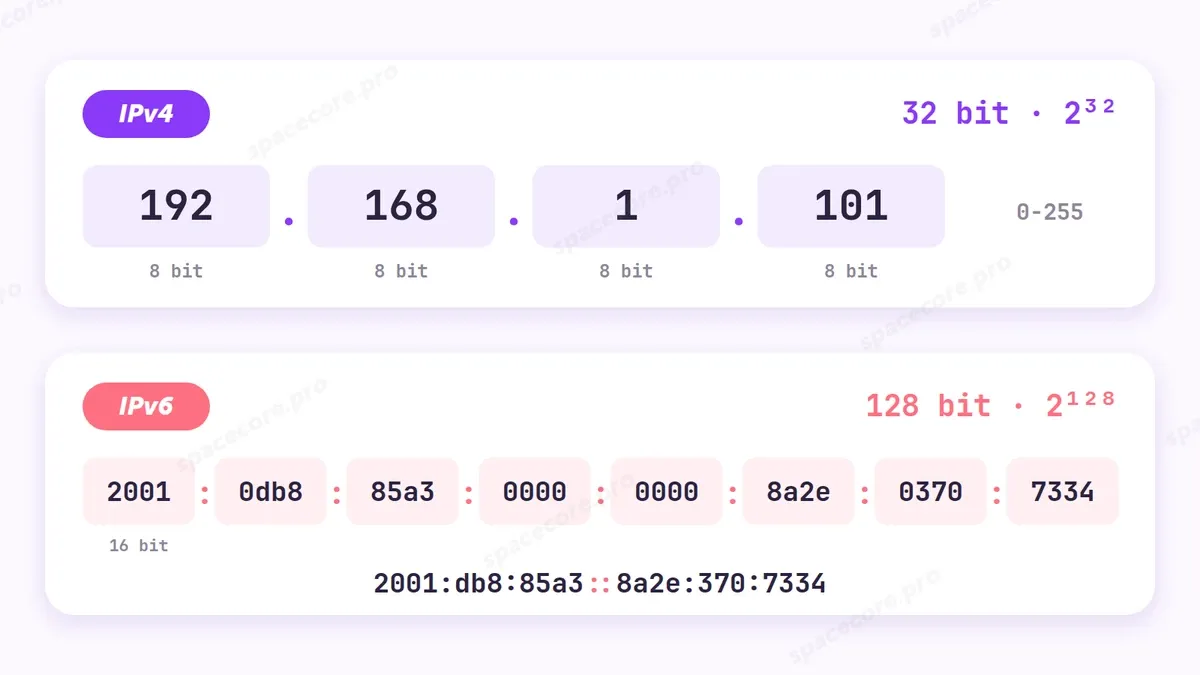
| IPv4 | IPv6 | |
|---|---|---|
| Length | 32 bits | 128 bits |
| Number of addresses | about 4.3 billion | 2 to the power of 128, a 39-digit number |
| Notation | 192.168.1.101 | 2001:db8:85a3::8a2e:370:7334 |
| NAT | needed almost always | usually not needed, every device gets an address |
A long IPv6 address can be shortened. Leading zeros in a group are dropped, and several zero groups in a row are replaced with two colons. An address starting with fe80 exists on almost every network card and works only inside the local network.
#Why addresses ran out
IPv4 was described in RFC 791 in September 1981. Four billion addresses seemed endless, as the whole internet had 213 computers back then. Thirty years later, on February 3, 2011, IANA handed out the last free blocks to the regional registries. The European RIPE NCC gave out its last addresses on November 25, 2019. That is where CGNAT comes from.
There is no IPv5, because number 5 was once given to an experimental protocol for voice and video. In the IANA registry it is still marked Reserved (Historic), so the next version became the sixth.
#Common Problems
| Symptom | Cause | Solution |
|---|---|---|
| The computer's address is 169.254.x.x, no internet | The computer did not get an address from the router | Check the cable or Wi-Fi, restart the router, run ipconfig /renew |
| An IP check website shows another country | A VPN or proxy is on | Turn off the VPN and reload the page |
| The WAN address in the router and the address on the website differ | The provider put you behind CGNAT | For access from the internet, order a public IP from your provider |
| Command 'ifconfig' not found | ifconfig is not installed | Use ip a |
| curl -6 fails or hangs for a long time | The connection has no IPv6 | Use curl -4 |
If a website or server is unreachable, include your public address and a traceroute in your support request. A separate article explains how to collect it.
Can someone find where I live by my IP address?
No. Geolocation databases know the country, city and provider, but not your home address. Only the provider knows exactly who an address is assigned to.
How do I find a website's IP address?
Run nslookup with the site name, for example nslookup spacecore.pro. It shows the IPv4 and IPv6 addresses if the site has them.
Did not find the answer? We are online 24/7.Contact support